
Running a business today means you live online as much as you do in your office or store. That’s where opportunity is—but it’s also where risks lurk. One of the biggest? Spam and phishing attempts.
Scammers don’t just target large corporations. In fact, small businesses are often more vulnerable because they don’t always have IT teams or security systems in place. The good news: with a few smart practices, you can protect yourself, your team, and your clients from costly mistakes.
What Is Phishing?
Phishing is when someone pretends to be a trusted company, colleague, or service provider to trick you into giving away sensitive information. Think of it as a con artist showing up in a costume—sometimes convincing, but always dangerous.
Spam is simply unsolicited messages, but phishing is spam with intent: to steal data, install malware, or hijack your accounts.
Common Red Flags of Spam & Phishing
Suspicious email addresses:
Real companies don’t use Gmail or Yahoo for security alerts. If you see “support@[company].com,” that’s likely fine. But if you see “companysupport@gmail.com,” that’s a red flag.
Urgency and threats:
Phrases like “Immediate Action Required” or “Your account will be suspended” are designed to make you panic. Scammers want you to act before you think. Generic greetings:
“Dear Merchant” or “Dear Customer” shows they don’t know who you are. A legitimate partner will use your name or business name.
Unusual Requests:
If an email asks you to reply with sensitive info, download an attachment, or click on a link instead of logging into your account directly, be cautious.
Strange Formatting or typos:
Misspellings, poor grammar, or formatting that doesn’t look professional are often signs of a scam.
What To Do If You’re Unsure if it is Spam or Phishing
Don’t click anything:
Links and attachments can contain malware. Go directly to the source. Instead of clicking, log into your account through the official website.
Verify the sender:
Hover over the sender’s email address to see if it matches the company’s domain.
Ask for help:
If it feels off, forward the message to your IT support or check with the provider through their official support channels.
Protecting Your Business from Phishing and Spam Attempts
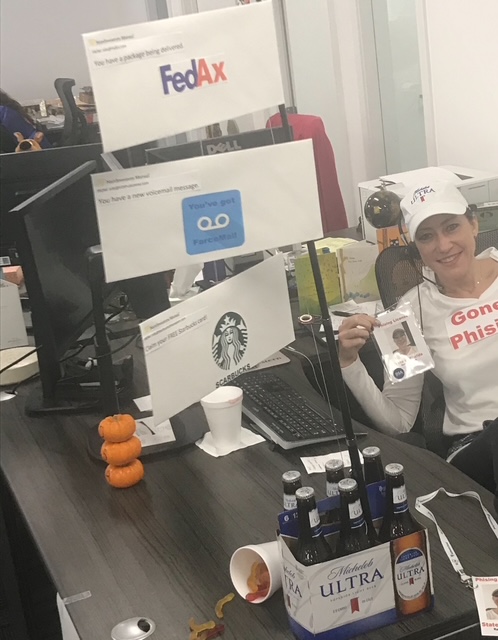
FedAx has your package, You’ve got a voicemail scam and Star’boo’ks gift card scam
Train your team:
Make sure everyone in your business knows how to spot suspicious messages.
Use Multi-Factor Authentication (MFA):
Even if your password is stolen, MFA adds a second layer of protection.
Keep software updated:
Many attacks exploit old software vulnerabilities.
Have a response plan:
Know what to do if someone accidentally clicks—change passwords immediately and run a security scan.
Final Thought
Your reputation, your clients’ trust, and your bottom line are worth protecting. Scammers count on fear, confusion, and rushed decisions. If you pause, verify, and stay alert, you’ll keep your business safer.
Remember: legitimate companies will never pressure you to give up information by email. When in doubt, log in directly or pick up the phone.
Want help building systems that protect both your business and your time? At Matczak Method, I help entrepreneurs streamline operations and safeguard their growth.
Leave a Reply